

Diameter Authentication and Accounting
How to configure and deploy Diameter Authentication and Accounting
Setting up freeDiameter
Section titled “Setting up freeDiameter”The current aaa_diameter OpenSIPS module uses the freeDiameter libraries and requires libfdcore and libfdproto version 1.2.1 or newer. The examples below use Debian/Ubuntu package names; adjust them for your distribution if needed.
Install the freeDiameter daemon, the development headers and the standard freeDiameter extensions:
sudo apt install freediameter freediameter-extensions libfreediameter-devfreeDiameter Client
Section titled “freeDiameter Client”The client side is represented by the aaa_diameter OpenSIPS module and the freeDiameter client library. This section configures the freeDiameter client library used by OpenSIPS.
freeDiameter identities are DNS hostnames, so make sure the client and server
names resolve. This tutorial uses the diameter.test realm with
client.diameter.test and server.diameter.test as peer identities. For a
single-host lab setup, /etc/hosts can contain:
127.0.0.1 client.diameter.test127.0.0.1 server.diameter.testUse the real host addresses if the Diameter peers run on separate machines.
Packages
Section titled “Packages”The aaa_diameter module dynamically links with libfdcore and
libfdproto. If you install OpenSIPS from Debian packages, the module is
shipped by:
sudo apt install opensips-diameter-moduleIf you build OpenSIPS from source, make sure libfreediameter-dev is installed
before compiling aaa_diameter. At runtime, the module also needs the
freeDiameter shared libraries, typically packaged as libfdcore6 and
libfdproto6 on Debian/Ubuntu systems.
Creating TLS Certificates
Section titled “Creating TLS Certificates”Even when the test peers use No_TLS, freeDiameter still expects certificate
paths in the configuration file. The following commands create a local CA and
a test certificate valid for both tutorial identities:
sudo install -d -m 0755 /etc/freeDiameter/tls
sudo openssl req -x509 -newkey rsa:2048 -nodes -days 3650 \  -subj "/CN=diameter.test test CA" \  -keyout /etc/freeDiameter/tls/ca.key \  -out /etc/freeDiameter/tls/ca.pem
sudo openssl req -newkey rsa:2048 -nodes \  -subj "/CN=*.diameter.test" \  -keyout /etc/freeDiameter/tls/peer.key \  -out /etc/freeDiameter/tls/peer.csr
printf "subjectAltName=DNS:client.diameter.test,DNS:server.diameter.test\n" | \  sudo tee /etc/freeDiameter/tls/peer.ext
sudo openssl x509 -req -days 3650 \  -in /etc/freeDiameter/tls/peer.csr \  -CA /etc/freeDiameter/tls/ca.pem \  -CAkey /etc/freeDiameter/tls/ca.key \  -CAcreateserial \  -extfile /etc/freeDiameter/tls/peer.ext \  -out /etc/freeDiameter/tls/peer.pem
These certificates are suitable for a local tutorial only.
The freeDiameter client configuration file
Section titled “The freeDiameter client configuration file”Create /etc/freeDiameter/freeDiameter-client.conf:
Identity = "client.diameter.test";Realm = "diameter.test";Port = 3866;SecPort = 3867;No_SCTP;
TLS_Cred = "/etc/freeDiameter/tls/peer.pem","/etc/freeDiameter/tls/peer.key";TLS_CA = "/etc/freeDiameter/tls/ca.pem";
ConnectPeer = "server.diameter.test" {  No_TLS;};
This instructs the OpenSIPS/freeDiameter client peer to establish a TCP
Diameter connection to server.diameter.test.
freeDiameter Server
Section titled “freeDiameter Server”The server side is represented by the app_opensips freeDiameter application, running inside the freeDiameter daemon.
Compiling app_opensips
Section titled “Compiling app_opensips”Build the extension against the same freeDiameter tree that provides your daemon and libraries:
sudo apt install mercurial cmake flex bison gcc make build-essential \  g++ swig libsctp-dev libgcrypt20-dev libgnutls28-dev libidn2-dev \  libmariadb-dev libmariadb-dev-compat
cd /path/to/freeDiameter
# copy or symlink the app_opensips directory into the freeDiameter extensions/ directorycp -r /path/to/opensips/modules/aaa_diameter/app_opensips extensions/app_opensips
# enlist the app_opensips extension for compilationcat >>extensions/CMakeLists.txt <<EOFFD_EXTENSION_SUBDIR(app_opensips "OpenSIPS Diameter integration for SIP Authorization, Authentication (RFC 4740) and Accounting" ON)EOF
mkdir -p fDbuildcd fDbuildcmake \  -DBUILD_TEST_APP:BOOL=ON \  -DBUILD_DBG_MONITOR:BOOL=ON \  -DSKIP_TESTS:BOOL=ON \  -DCMAKE_BUILD_TYPE:STRING=Debug \  ..
make -j
If the build completes, the extension module should be available as
extensions/app_opensips.fdx under the freeDiameter build directory.
If your freeDiameter server runs on a separate machine, add the same
client.diameter.test and server.diameter.test DNS records on that host as
well.
The freeDiameter server configuration file
Section titled “The freeDiameter server configuration file”Create /etc/freeDiameter/freeDiameter.conf:
Identity = "server.diameter.test";Realm = "diameter.test";Port = 3868;No_SCTP;
TLS_Cred = "/etc/freeDiameter/tls/peer.pem","/etc/freeDiameter/tls/peer.key";TLS_CA = "/etc/freeDiameter/tls/ca.pem";
# Load the standard SIP AVP dictionary and the app_opensips module.LoadExtension = "/usr/lib/freeDiameter/dict_sip.fdx";LoadExtension = "/path/to/freeDiameter/fDbuild/extensions/app_opensips.fdx";
# Optional: also initiate the Diameter connection towards OpenSIPS on startup.ConnectPeer = "client.diameter.test" {  No_TLS;  port = 3866;};
The dict_sip.fdx path may differ by distribution, so adjust it to the
installed location of the freeDiameter extensions.
Test that app_opensips loads:
freeDiameterd -ddThe startup log should show dict_sip.fdx, app_opensips.fdx, and the
[AUTH] connected to MySQL message if the hardcoded tutorial database
connection succeeds.
Configuration
Section titled “Configuration”If you are building from source, verify that aaa_diameter compiles:
make modules module=aaa_diameterFor package-based deployments, install opensips-diameter-module instead.
Digest Authentication
Section titled “Digest Authentication”The current app_opensips tutorial server code connects to MySQL using:
mysql://opensips:opensipsrw@localhost/opensipsIt reads the subscriber table and expects the HA1 hash in the ha1 column.
Create the OpenSIPS database accordingly before starting freeDiameter.
Here are the relevant opensips.cfg sections for SIP digest authentication
over Diameter:
log_stdout = yes # required in order to see the freeDiameter library logs...alias = udp:sipdomain.invalid:5060...loadmodule "auth.so"
loadmodule "aaa_diameter.so"modparam("aaa_diameter", "fd_log_level", 0)modparam("aaa_diameter", "realm", "diameter.test")modparam("aaa_diameter", "peer_identity", "server")
loadmodule "auth_aaa.so"modparam("auth_aaa", "aaa_url", "diameter:/etc/freeDiameter/freeDiameter-client.conf")...route {    ...
    if (is_method("INVITE")) {        ...        if (!aaa_proxy_authorize("sipdomain.invalid")) {            proxy_challenge("sipdomain.invalid", "auth");            exit;        }        ...    }}...
The aaa_diameter module must be loaded before auth_aaa, because
auth_aaa binds to the configured AAA protocol through its aaa_url
parameter.
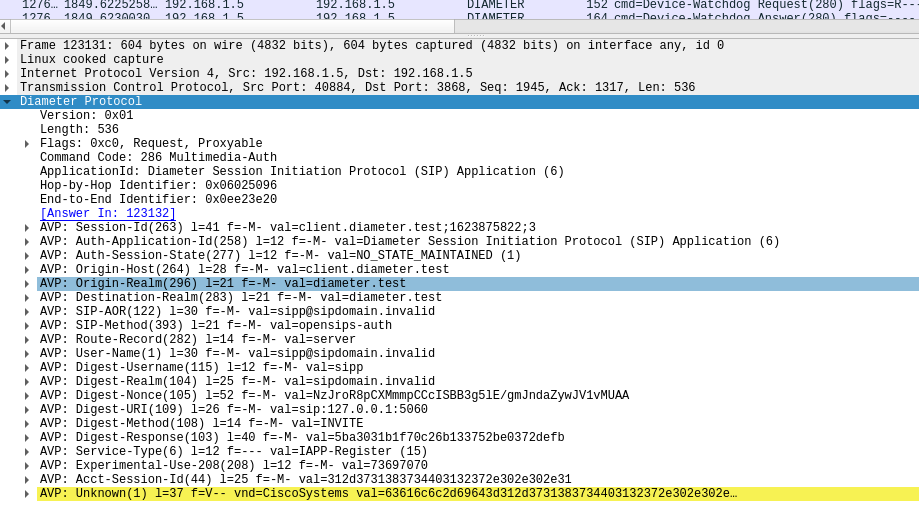
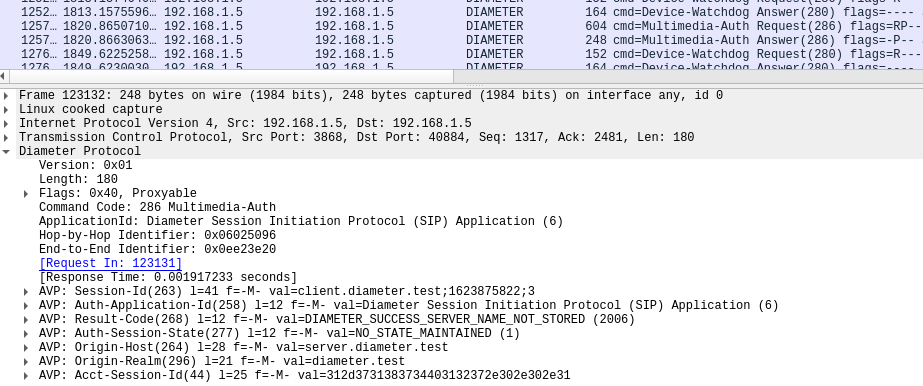
Here is what a Diameter authentication request and a successful reply look like in Wireshark:
Diameter authentication request:
Successful Diameter authentication reply:
Accounting
Section titled “Accounting”The current app_opensips tutorial server appends CDRs to
/var/log/freeDiameter/acc.log and rotates this file daily. It also writes
the AAA AVPs generated by the OpenSIPS acc module, including the CDR fields
enabled by the cdr accounting flag.
To enable Diameter accounting support in opensips.cfg, configure the relevant
modules as follows:
log_stdout = yes # required in order to see the freeDiameter library logs...loadmodule "rr.so"loadmodule "dialog.so"
loadmodule "aaa_diameter.so"modparam("aaa_diameter", "fd_log_level", 0)modparam("aaa_diameter", "realm", "diameter.test")modparam("aaa_diameter", "peer_identity", "server")
loadmodule "acc.so"modparam("acc", "aaa_url", "diameter:/etc/freeDiameter/freeDiameter-client.conf")...route {    ...
    if (is_method("INVITE")) {        ...        record_route();        create_dialog();        do_accounting("aaa", "cdr");        ...    }}...
The cdr flag requires dialog support, so dialog must be loaded and a
dialog must be created for the initial INVITE.