

Tutorial Overview
Section titled “Tutorial Overview”SIPREC is a standard that specifies how to do call recording in a non-intrusive way, using an external recorder. Using this protocol you can move the call recording features out of your media server to one or many recorder(s), without interfering with the actual RTP flow. According to the SIPREC architecture, in order to record a call, you need two components:
- SRC (Session Recording Client) - this is the SIP component in the call’s path which triggers the call recording - this is where OpenSIPS gets involved.
- SRS (Session Recording Server) - this is the SIP component that receives the SIPREC session and the forked media, then stores or processes the recording.
Oreka is one example of a SRS, but OpenSIPS can work with any SRS implementation that understands SIPREC. Other options include Sippy SRS, Drachtio SRS with FreeSWITCH, or even another OpenSIPS instance using b2b_sdp_demux in front of FreeSWITCH.
This document describes the steps to configure OpenSIPS devel to act as a SRC and engage one or more SRS endpoints in an ongoing call.
The work for the SIPREC module has been sponsored by the OrecX Company.
Architecture
Section titled “Architecture”The purpose of this article is to show how one can record a call between two clients, let’s call them Alice and Bob. In order to do that, we need the following components:
- OpenSIPS - will act as a SRC, providing metadata about the call to the SRS.
- SRS - will receive the SIPREC session and perform the actual recording or recording handoff.
- RTP relay - will fork the RTP traffic to the SRS. In OpenSIPS devel, SIPREC can use either RTPProxy or RTPEngine, through the rtp_relay module.
The following diagram shows the setup and how each component interacts with the others. The diagram uses RTPProxy as the media relay example, but the same OpenSIPS SIPREC flow can be used with RTPEngine.
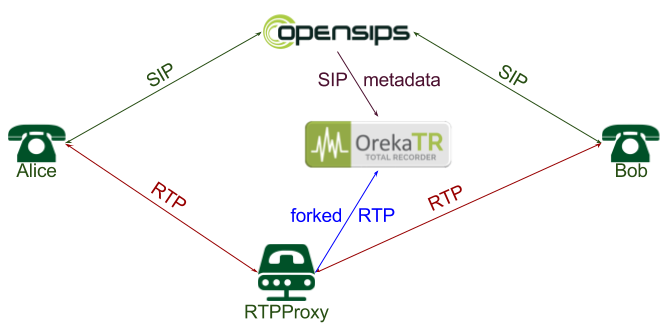
According to the diagram, Alice and Bob do not need to have any recording capabilities. They behave as regular SIP clients, sending SIP traffic to the OpenSIPS proxy and RTP media through the RTP relay. When a call is selected for recording, OpenSIPS starts a SIPREC session to the SRS, providing metadata about Alice and Bob, as well as the recording SDP. The SRS then decides whether the call should be recorded. If it accepts the session with a 200 OK, OpenSIPS instructs the RTP relay to fork the clients’ media to the SRS. When the call ends, OpenSIPS also closes the SIPREC session with the SRS.
Basic Configuration
Section titled “Basic Configuration”In this article we will only discuss how OpenSIPS can be used to record calls using the SIPREC protocol. We will not address the SRS, RTPProxy or RTPEngine configuration, but these components should already be functional before enabling SIPREC in OpenSIPS.
We will start from an existing working setup for OpenSIPS and gradually add the necessary parts to it. The examples below follow the OpenSIPS devel default residential script, which provides basic call routing for clients.
The first thing we need to do is load the necessary modules:
- tm: transaction support, already loaded by the default script.
- dialog: used to keep track of the call status and close the recording when the call ends. It is also needed to handle sequential messages.
- b2b_entities: automatically manages the SIPREC session towards the SRS.
- siprec: provides the call recording logic.
- rtp_relay: provides the common RTP relay interface used by SIPREC.
- rtpproxy or rtpengine: controls the selected media relay backend.
Add the following lines in the modules section of the script:
loadmodule "dialog.so"loadmodule "b2b_entities.so"loadmodule "siprec.so"loadmodule "rtp_relay.so"
# choose the backend that matches your media relayloadmodule "rtpproxy.so"# loadmodule "rtpengine.so"
Then specify the connector to the selected media relay. For RTPProxy:
modparam("rtpproxy", "rtpproxy_sock", "udp:127.0.0.1:7899")Or, if you use RTPEngine instead:
modparam("rtpengine", "rtpengine_sock", "udp:127.0.0.1:2223")Now we need to identify the calls we want to record. This can be done using whatever logic you want in your script, but for simplicity in this example, we will engage call recording for all calls. Find the section that handles the initial INVITEs. In the default script, this is done in the following snippet:
# account only INVITEsif (is_method("INVITE")) {
    do_accounting("log");}
In this code section, we need to do three things:
- create the dialog, so OpenSIPS can track the call and the recording lifecycle.
- engage the RTP relay in the call using
rtp_relay_engage(). - instruct the SIPREC module that this call is intended to be recorded, by provisioning the SIP URI of the SRS.
In this simple scenario, the SRS is located on the same machine as OpenSIPS, listening on port 5090:
# account only INVITEsif (is_method("INVITE")) {    create_dialog();
    $rtp_relay = "co";    $rtp_relay_peer = "co";    rtp_relay_engage("rtpproxy");    # rtp_relay_engage("rtpengine");
    siprec_start_recording("sip:127.0.0.1:5090");    do_accounting("log");}
The rtp_relay_engage() function does not immediately perform all media operations. It registers the RTP relay context for the call, then automatically handles the required offer/answer and delete operations as the dialog progresses. SIPREC uses this RTP relay context when it asks the selected backend to fork media to the SRS. When no instance name is provided, siprec_start_recording() starts the default SIPREC instance for the call.
A full sample configuration is available in the SIPREC module examples: opensips.cfg.
Recording Start Time
Section titled “Recording Start Time”Recording does not have to be triggered at only one point in the call. If siprec_start_recording() is called on the initial INVITE, OpenSIPS prepares the SIPREC instance and starts it when both sides have provided SDP, usually after a 183 or 200 OK. This is useful when early media should also be eligible for recording.
If you only want to record established calls, keep the dialog and RTP relay engagement on the initial INVITE, but call siprec_start_recording() from an onreply_route when the 200 OK is processed:
if (is_method("INVITE")) {    create_dialog();
    $rtp_relay = "co";    $rtp_relay_peer = "co";    rtp_relay_engage("rtpproxy");
    t_on_reply("start_recording_on_answer");    do_accounting("log");}
onreply_route[start_recording_on_answer] {    if (t_check_status("200") && has_body("application/sdp")) {        $siprec(group) = "answered";        siprec_start_recording("sip:127.0.0.1:5090");    }}
You can also start a SIPREC instance later in the call, for example from the in-dialog re-INVITE or UPDATE handling path, as long as the dialog is known and the media relay context can provide the required SDP information.
Recording Instances
Section titled “Recording Instances”The siprec_start_recording() function also supports multiple SIPREC instances for the same call. In OpenSIPS, a SIPREC instance is a separately controlled recording, identified by name, which creates its own SIPREC session towards an SRS. If your deployment uses recording profiles, each profile can map to a named SIPREC instance, for example one instance for compliance recording and another one for quality monitoring. The instance name is the second parameter of siprec_start_recording(), and instance-specific settings are provisioned through the indexed $siprec variable:
$(siprec(group)[compliance]) = "compliance";$(siprec(headers)[compliance]) = "X-Recording-Profile: compliance\r\n";siprec_start_recording("sip:compliance-srs@example.net;transport=tcp", "compliance");
$(siprec(group)[qa]) = "quality";$(siprec(headers)[qa]) = "X-Recording-Profile: quality\r\n";siprec_start_recording("sip:qa-srs@example.net:5090", "qa");
Each SIPREC instance has its own SRS URI list and its own $siprec settings. This allows different SRS clusters, metadata, headers or outgoing sockets to be used independently for each named instance of the same call.
Pause, Resume and Stop Recording
Section titled “Pause, Resume and Stop Recording”A SIPREC instance can be paused, resumed or stopped after it has been started. These operations target the default instance unless a named instance is provided:
if (has_totag() && is_method("INVITE")) { if (is_audio_on_hold()) siprec_pause_recording("compliance"); else siprec_resume_recording("compliance");}Stopping a SIPREC instance ends that instance for the call. Other instances continue independently:
if (has_totag() && is_method("INFO") && $hdr(X-Stop-Recording) == "yes") siprec_stop_recording("qa");These functions are useful for pause-on-hold logic, user-driven privacy controls, or for terminating only a specific SIPREC instance while keeping the call alive.
Control Recording from MI Events
Section titled “Control Recording from MI Events”You can also control a SIPREC instance from an external application by raising a custom Event Interface event through MI, then handling that event in the OpenSIPS script. The event handler can load the dialog context based on a Dialog ID or SIP Call-ID passed as an event parameter, then call the SIPREC pause/resume functions inside that dialog context.
For example, an external controller can raise a toggle event for a named SIPREC instance:
$ opensips-mi evi:raise -j '{"event":"E_SIPREC_TOGGLE","params":{"callid":"call-123@example.net","instance":"compliance"}}'The script can catch the event, load the dialog context and use a dialog flag to remember the current pause state:
event_route[E_SIPREC_TOGGLE] {    $var(dlg_id) = $params(callid);    $var(id_type) = "callid";
    if ($params(dlg_id) != NULL) {        $var(dlg_id) = $params(dlg_id);        $var(id_type) = "did";    }
    if ($var(dlg_id) == NULL) {        xlog("E_SIPREC_TOGGLE: missing callid or dlg_id parameter\n");        exit;    }
    if (!load_dialog_ctx($var(dlg_id), $var(id_type), 1)) {        xlog("E_SIPREC_TOGGLE: cannot load dialog $var(dlg_id) as $var(id_type)\n");        exit;    }
    if (is_dlg_flag_set("SIPREC_PAUSED")) {        if (siprec_resume_recording($params(instance))) {            reset_dlg_flag("SIPREC_PAUSED");            xlog("SIPREC resumed by MI event for dialog $var(dlg_id), instance=$params(instance)\n");        }    } else {        if (siprec_pause_recording($params(instance))) {            set_dlg_flag("SIPREC_PAUSED");            xlog("SIPREC paused by MI event for dialog $var(dlg_id), instance=$params(instance)\n");        }    }
    unload_dialog_ctx();}
The example above passes an instance parameter and controls a named SIPREC instance. For the default instance, omit the MI instance parameter and call siprec_pause_recording() or siprec_resume_recording() without arguments.
Recording Events
Section titled “Recording Events”The SIPREC module raises two events that can be used to monitor when an SRS starts or stops recording a call:
E_SIPREC_START- raised when the SIPREC call is established and recording starts.E_SIPREC_STOP- raised when the SIPREC call is terminated.
Both events expose the same parameters:
dlg_id- dialog id of the call being recorded.dlg_callid- Call-ID of the call being recorded.callid- Call-ID of the SIPREC B2B call.session_id- SIPREC UUID of the recording call.server- SIPREC server handling the recording.instance- SIPREC instance that triggered the event.
These are regular OpenSIPS Event Interface events, so they can be consumed either by local script event_route blocks or by external applications. For external applications, load the desired event transport module and subscribe the proper endpoint to E_SIPREC_START and E_SIPREC_STOP, either from the script with subscribe_event() or at runtime through MI. The endpoint format depends on the transport module; see the Events Interface manual for the supported subscription endpoints.
For example, you can log the recording lifecycle directly from the OpenSIPS script using event_route blocks:
event_route[E_SIPREC_START] {    xlog("SIPREC started: dlg_id=$params(dlg_id), dlg_callid=$params(dlg_callid), siprec_callid=$params(callid), session=$params(session_id), server=$params(server), instance=$params(instance)\n");}
event_route[E_SIPREC_STOP] {    xlog("SIPREC stopped: dlg_id=$params(dlg_id), dlg_callid=$params(dlg_callid), siprec_callid=$params(callid), session=$params(session_id), server=$params(server), instance=$params(instance)\n");}
Defining the event_route automatically subscribes the script to the matching event, so no explicit subscription is needed for this local logging use case.
Advanced Configuration
Section titled “Advanced Configuration”Communicate with SRS over TCP
Section titled “Communicate with SRS over TCP”Although UDP communication is lightweight and the base protocol for SIP, in practice it has a big limitation: it cannot always carry large packets of data. This is a common SIPREC case: large SDP payloads, combined with XML metadata and SIP overhead, can exceed the MTU. In order to avoid IP fragmentation, you may want to communicate with the SRS over TCP.
To do so, make three changes to the script:
- load the proto_tcp module:
loadmodule "proto_tcp.so"- add a TCP socket which OpenSIPS can use to communicate with the SRS:
socket=tcp:127.0.0.1:5060- change the SRS URI, adding the
;transport=tcpparameter:
siprec_start_recording("sip:127.0.0.1:5090;transport=tcp");After these changes, OpenSIPS will communicate with the SRS over TCP.
Use a Specific Interface to Communicate with the SRS
Section titled “Use a Specific Interface to Communicate with the SRS”In real scenarios, you may want to keep the communication with the SRS on a separate or dedicated IP in a local LAN. In OpenSIPS devel, this should be done through the $siprec(socket) variable before calling siprec_start_recording():
$siprec(socket) = "tcp:10.0.0.10:5060";siprec_start_recording("sip:10.0.0.20:5090;transport=tcp");For a named SIPREC instance, index the $siprec setting with the instance name:
$(siprec(socket)[compliance]) = "tcp:10.0.0.10:5060";siprec_start_recording("sip:10.0.0.20:5090;transport=tcp", "compliance");The old force_send_socket() style is no longer needed for SIPREC socket selection. Use $siprec(socket) instead, so the socket is scoped to the SIPREC request and does not affect normal call routing.
Some changes are better applied on the generated SIPREC request itself. Because the SIPREC session is created by the B2B layer, local_route can be used to inspect or adjust the locally generated request before it is sent out:
local_route { if (is_method("INVITE") && $ru =~ "^sip:.*@10\\.0\\.0\\.20:5090") { append_hf("X-Recording-Origin: opensips\r\n"); }}Use $siprec(...) for SIPREC parameters known before siprec_start_recording(), and use local_route for changes that depend on the final generated SIP request. In production, scope the local_route condition to your SRS routing pattern, a marker header, or any other policy that identifies SIPREC-generated requests.
Tune SIPREC Metadata and Request Parameters
Section titled “Tune SIPREC Metadata and Request Parameters”Most SIPREC instance settings can be tuned using the $siprec variable. This includes:
group- call classification metadata.callerandcallee- custom XML participant metadata.media- media-related information used in the recording SDP.headers- extra SIP headers added to the initial request towards the SRS.socket- the outgoing OpenSIPS socket used towards the SRS.from_uriandto_uri- URIs used in the generated SIPREC dialog headers.group_custom_extensionandsession_custom_extension- custom XML extensions.
For example:
$xml(caller_xml) = "<nameID></nameID>";$xml(caller_xml/nameID.attr/aor) = "sip:john@opensips.org";$xml(caller_xml/nameID) = "<name>John Doe</name>";
$siprec(group) = "regular";$siprec(caller) = $xml(caller_xml/nameID);$siprec(headers) = "X-Account-ID: " + $avp(account_id) + "\r\n";$siprec(from_uri) = "sip:recorder-src@opensips.org";$siprec(to_uri) = "sip:recording@example.net";
siprec_start_recording("sip:127.0.0.1:5090;transport=tcp");
The $siprec variable is scoped to the current message, so set it immediately before calling siprec_start_recording(). For named SIPREC instances, use the indexed form, such as $(siprec(headers)[qa]).
SRS Failover
Section titled “SRS Failover”There might be cases when a SRS is down or cannot be reached, and you want to fail over to a different server. This can be achieved by listing multiple SRS URIs in the first parameter of the siprec_start_recording() function, separated by commas. The following example tries to connect to the SRS over TCP, and if that fails, it tries to reach it over UDP:
siprec_start_recording("sip:127.0.0.1:5090;transport=tcp, sip:127.0.0.1:5090");By default, failover is driven by a negative response from the SRS, or by an auto-generated 408 if the SRS does not respond. However, not all responses mean the service is unavailable. Some of them might simply indicate that the call should not be recorded. In this case, you may want to ignore some response codes from the failover algorithm. This is done using the skip_failover_codes parameter. The following example prevents failover for any 3xx and 4xx response codes, thus it only fails over on 5xx and 6xx classes:
modparam("siprec", "skip_failover_codes", "[34][0-9][0-9]")For more advanced failover logic, you can capture a generated placeholder SRS URI in local_route, let dispatcher select the real SRS from a provisioned pool, then use a failure_route to mark failed SRS destinations and retry the next one. A complete sample is available in the SIPREC module examples: siprec-dispatcher.cfg.